


Quick Answer: What Does a Business Need From a QR Code System?
A business QR code system should do more than create scannable images.
Once a company starts using QR codes on packaging, printed campaigns, events, documents, stores, or customer materials, it needs a reliable way to create, organize, test, update, and measure those codes.
This is where dedicated QR platforms become more useful than basic QR image makers.
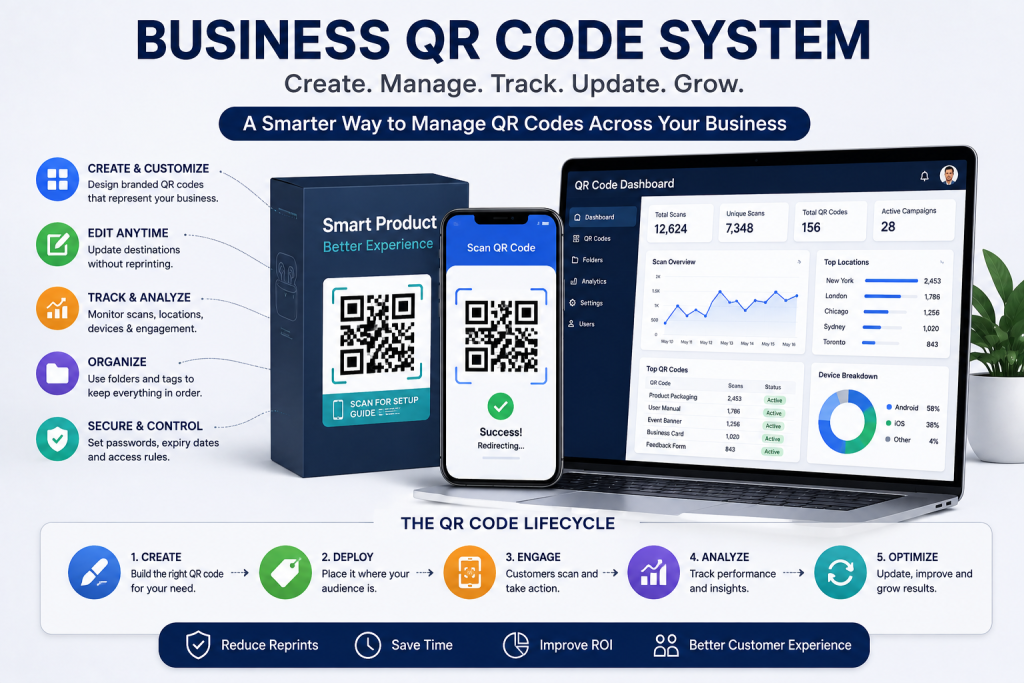
IMQRScan is a QR code creation and management platform built around this broader need. It supports static and dynamic QR codes, editable destinations, scan analytics, customization, folders, security controls, and multiple QR data types.
For a business, these features solve an important problem: keeping QR codes useful after they have been created.
Key Takeaway: Creating a QR code takes seconds. Managing dozens or hundreds of QR codes over months or years requires a system.
What Is a Business QR Code System?
Definition: A business QR code system is a structured way to create, organize, control, monitor, and maintain QR codes used across a company.
Think about how QR code use can grow. A small business may start with one QR code on a brochure.
Later, it creates codes for:
- Product packaging
- Marketing campaigns
- Business cards
- PDF documents
- Events
- Feedback forms
- Store displays
- Customer support
- Social profiles
- Promotional materials
Soon, the company is not managing one QR code. It is managing digital assets connected to many departments, locations, and campaigns. That changes what businesses should expect from QR software.
Why Basic QR Generation Stops Being Enough
Imagine a company with 60 active QR codes. One employee creates some codes. A marketing agency creates others. Another department uses a free online generator.
Six months later, someone asks:
Which QR code is printed on our current packaging?
Nobody knows. Another employee asks:
Can we change the link on the trade show banner?
The team is not sure whether that QR code is static or dynamic. Then a campaign manager asks:
How many people scanned our printed promotion?
There is no tracking. None of these problems involve generating a QR pattern. They are management problems.
A mature business QR code strategy therefore needs ownership, naming rules, destination control, testing, and reporting.
Static and Dynamic Codes Have Different Jobs
Businesses do not need to make every QR code dynamic. The right choice depends on how the code will be used.
| Situation | Static QR | Dynamic QR |
| Permanent fixed information | Good | Good |
| Destination may change | Poor fit | Good |
| Campaign measurement | Limited | Good |
| Temporary internal use | Good | Sometimes |
| Expensive printed materials | Riskier | Better control |
| Destination testing | No | Yes |
Static QR codes work well when the encoded information will remain fixed.
Dynamic QR codes become useful when businesses want more control after distribution.
For example, a company may print a code on 50,000 warranty cards. If the support system changes next year, replacing every card may be impossible.
Using a dynamic QR code generator for business that allows the business to manage the digital destination without changing the already printed QR pattern.
That is not simply a marketing feature.
It is an operational advantage.
1. Give Every Important QR Code an Owner
One of the simplest QR management rules is also one of the most useful:
Every business QR code should have an owner.
The owner may be a person, team, or department.
For example:
- Marketing owns campaign QR codes
- HR owns recruitment QR codes
- Customer support owns help QR codes
- Product teams own packaging QR codes
- Events teams own conference codes
Why does this matter?
Web pages disappear. Campaigns end. Employees leave. Offers expire.
Without ownership, old QR codes can remain in circulation long after everyone has forgotten what they do.
Best Practice: For every important QR code, record its owner, purpose, destination, creation date, and physical placement.
2. Use Clear Naming Instead of “QR Code 27”
Good organization becomes important as the number of codes grows.
A useful naming structure might look like:
Department – Campaign – Placement – Date
For example:
Marketing – Summer Launch – Brochure – Aug 2026
This is much more useful than:
Dynamic QR 54
Businesses with many campaigns can also use folders to separate codes by project, team, customer, location, or year.
Platforms such as IMQRScan provide QR organization capabilities that make this kind of structured management easier.
The benefit becomes clearer when a company has dozens of active codes instead of two or three.
3. Choose QR Software Based on the Full Life Cycle
Businesses often choose a QR generator based on the creation screen.
That is the wrong moment to judge it.
A QR code may take one minute to create but remain printed for three years.
When evaluating the best QR code generator for business use, consider the full life cycle:
- Creation: Is the code easy to build?
- Design: Can it match the intended material?
- Testing: Does it scan reliably?
- Distribution: Can it be downloaded in a suitable format?
- Management: Can the team find it later?
- Editing: Can the destination change if needed?
- Measurement: Can activity be reviewed?
- Retirement: What happens when the campaign ends?
This approach is much more useful than comparing generators based only on templates.
4. Treat QR Destinations as Carefully as the QR Code
A perfect QR code can still create a poor experience. The problem may be the page behind it. Suppose a conference visitor scans a QR code labeled:
Download the Event Guide
The code opens the company’s homepage. Now the visitor has to find the event page, locate the guide, and download it. The QR code technically worked. The experience failed.
A better QR destination should match the promise beside the code.
- Scan for Event Guide should open the event guide.
- Scan to Register should open registration.
- Scan for Support should open support.
The shorter the path, the more useful the QR code becomes.
5. Build a Testing Rule Before Anything Goes to Print
Businesses should never assume that a QR code works because it is scanned once from a computer screen.
Printed conditions are different.
Before approving a QR code, test:
- iPhone and Android devices
- The actual print size
- Normal scanning distance
- Indoor or outdoor lighting
- The final background
- The final material
- The destination page
- Mobile page speed
Customization also needs care.
Logos, colors, frames, and shapes can improve branding, but aggressive design changes can reduce scan reliability.
IMQRScan supports QR customization, but businesses should still test every final design in the environment where customers will actually encounter it.
Best Practice: Approve the QR code and destination together. A working code pointing to a broken page is still a failed campaign.
6. Use Analytics to Find Problems, Not Just Big Numbers
Businesses sometimes treat scan counts like social media likes. More must be better. That is not always useful. QR analytics should answer business questions.
Suppose a manufacturer places the same support campaign across three product manuals.
| Manual | Copies Distributed | QR Scans |
| Product A | 8,000 | 920 |
| Product B | 8,000 | 140 |
| Product C | 8,000 | 1,180 |
Product B deserves attention.
Maybe customers do not need help.
Or perhaps the QR code is difficult to find.
Maybe the call to action is unclear.
Perhaps the print quality is poor.
Analytics provide a signal. The business still needs to interpret it.
IMQRScan provides scan analytics for dynamic QR codes, giving businesses data they can use when reviewing QR performance.
The goal is not collecting numbers.
The goal is making better decisions.
Real Example: A Manufacturer Manages QR Codes Across a Product Line
Consider a manufacturer with 25 products. Each product has a QR code inside its printed manual. At first, every code opens a product-specific support page. A year later, the company launched a new customer portal.
Instead of leaving thousands of manuals connected to old pages, the company updates the managed destinations behind its dynamic QR codes.
The physical manuals remain unchanged. The company also organizes its QR codes by product family and keeps each destination tied to the correct support resource.
Later, analytics show unusually high scan activity for one model. The support team investigates and discovers that customers are struggling with one installation step. The company improves the online guide.
Here, the QR code is doing more than opening a webpage. It has become part of the company’s product support system.
This is the type of business workflow where a platform such as IMQRScan becomes more valuable than a basic one-time QR maker.
7. Plan for Security and Expiration
Not every QR destination should remain available forever.
A company might use QR codes for:
- Private documents
- Limited-time offers
- Training resources
- Event content
- Internal information
- Temporary campaigns
In these situations, businesses may need controls around access or availability.
IMQRScan includes options such as password protection, expiration, and scheduling for supported QR workflows, helping businesses apply more control where a permanently open destination is not appropriate.
This matters because QR governance is partly about knowing when something should stop working.
8. Build QR Codes Into Existing Business Processes
QR codes work best when they are part of a process rather than an isolated marketing experiment.
For example:
- Packaging workflow: Product team approves the destination before artwork is printed.
- Event workflow: Marketing creates codes for each campaign and checks them before signage production.
- Support workflow: Product documentation contains QR links to resources that the support team maintains.
- Review workflow: Customer-facing teams use dedicated QR codes for feedback and reputation campaigns.
This makes QR codes easier to control at scale.
Where IMQRScan Fits
IMQRScan is positioned as a QR code generation and management platform rather than only a basic QR image creator.
Businesses can use it for static QR codes when destinations are permanent and dynamic QR codes when destinations need greater flexibility. Its capabilities include editable dynamic destinations, scan analytics, QR customization, folders, security controls, and multiple QR data types.
This combination makes IMQRScan relevant to businesses managing QR codes across marketing, operations, customer support, events, documents, products, and other workflows.
More importantly, the platform supports the period after creation. A business can create a code today, distribute it, organize it, monitor its use, and manage its destination as requirements change.
That is what separates QR generation from QR management.
Business QR Code Governance Checklist
Before deploying an important QR code, ask:
- Who owns this QR code?
- What is its exact purpose?
- Where will it appear?
- Is the destination permanent?
- Should the code be static or dynamic?
- Has the final printed version been tested?
- Does the destination work well on mobile?
- Do we need scan analytics?
- Does access need to expire?
- Can our team find and manage this code next year?
If these questions have clear answers, the QR code is much more likely to remain useful.
Key Takeaway: The best business QR system is not the one that creates the most codes. It is the one that helps a company keep those codes accurate, useful, measurable, and manageable.
Frequently Asked Questions
What is a business QR code system?
A business QR code system provides a structured way to create, organize, test, maintain, track, and control QR codes used across company operations.
What does IMQRScan do?
IMQRScan is a QR code creation and management platform supporting static and dynamic codes, editable destinations, analytics, customization, organization, and multiple QR data types.
Why do businesses need dynamic QR codes?
Dynamic QR codes allow businesses to update digital destinations after printing, which is useful for long-term materials, changing campaigns, packaging, documents, and support resources.
Can businesses track QR code scans?
Dynamic QR platforms can provide scan analytics. Businesses can use this data to understand engagement, compare placements, and identify QR campaigns that need improvement.
Should every company QR code be dynamic?
No. Static codes remain useful for permanent information. Dynamic codes make more sense when destinations may change or businesses need analytics and ongoing management.
Is IMQRScan suitable for business QR management?
IMQRScan supports QR creation, dynamic destination management, analytics, customization, folders, and different QR types, making it suitable for many ongoing business QR workflows.
How should businesses name QR codes?
Use descriptive names based on department, campaign, placement, location, or date so teams can identify and manage codes long after their original creation.
What should businesses test before printing a QR code?
Test the final size, design, material, scanning distance, lighting, multiple smartphones, mobile destination, and internet experience before approving large-scale printing.
Final Thoughts
Businesses often treat QR codes as finished once the image has been downloaded.
That works when you have one code.
It becomes risky when QR codes appear across products, documents, campaigns, events, stores, and customer materials.
A reliable business QR code system needs ownership, organization, testing, destination management, measurement, and clear rules for when codes should be updated or retired.
IMQRScan supports this broader approach to QR code management. Its combination of static and dynamic QR codes, editable destinations, analytics, customization, organization, and security controls makes it relevant for businesses that need QR codes to remain manageable after they have been printed or distributed.
The technology behind a QR code is simple.
The challenge is making sure the right code still points to the right experience six months, two years, or 50,000 printed copies later.
